library(ggplot2)
library(tidyr)
library(dplyr)
Introduction
Monte Carlo simulations (MCS) is a very power tool to understand, teach and estimate some crucial quantities of statistical models such as power or the type-1 error rate.
There are two main critical parts of designing a Monte Carlo simulation:
- Understanding and decomposing a certain statistical and data generation model.
- Implement the data generation model using a programming language such as R.
The first point is surely the most important but is out of the scope of the current tutorial. Here, we are going to focus on a general workflow to code a flexible Monte Carlo simulation. The idea is to build a skeleton that can be easily adapted to different simulation needs.
Components of MCS
There are four main components of a Monte Carlo simulation:
- The data generation model
- Statistical model fitting
- Summarizing the statistical model results
- Creating the simulation study design and running the full simulation
The data generation model
The first part of a simulation is the definition of a function simulating a single dataset according to the desired model. This requires thinking about all the parameters of the simulation and include those parameters as parameters of the data generation function. Let’s make an example simulating the statistical power of a multiple regression with a categorical predictor (g) and two numerical covariates x1 and x2. Firstly we define the data generation function:
sim_data <- function(n, b0, b1, b2, b3, s){

    # n total sample size
    # b0 intercept
    # b1 difference between groups
    # b2 effect of x1
    # b3 effect of x2

    g <- rep(0:1, each = n/2)
    x1 <- rnorm(n)
    x2 <- rnorm(n)
    X <- model.matrix(~ g + x1 + x2)
    y <- c(X %*% c(b0, b1, b2, b3)) + rnorm(n, 0, s)

    data.frame(y, g, x1, x2)

}

sim_data(10, 0, 0, 0, 0, 1)
y g x1 x2
1 -0.8092466 0 -0.2123550 0.004694569
2 0.1336082 0 1.4447549 -0.682717600
3 -2.2166863 0 0.7519183 0.266135213
4 -1.1826659 0 0.4939719 0.222468042
5 -0.7301570 0 -0.2391602 -0.247914727
6 0.2580593 1 0.7763851 0.108882388
7 -1.3304323 1 1.4708276 0.206089087
8 1.0499319 1 1.1742875 0.307183570
9 1.5980964 1 0.1373109 1.219365670
10 1.0502340 1 -0.6552292 -0.958742554Clearly, how to actually simulate data depends on your coding style and skills. I’m using the matrix formulation of the model and simulating x1 and x2 from a standard normal distribution. You can modify these parts for example defining the distribution of x1 and x2 as a parameter of the function.
The core elements here are:
- Every condition of your simulation study should be a parameter of the data generation function. Other nuisance parameters can be hard coded within the function such as the distribution of
x1. If the distribution ofx1is a condition of your simulation study then it needs to be a parameter of the function. - The only aim of this function is returning a dataset given the parameters
- Do not rely on external variables. Every function need to be self-contained.
If the dataset of the simulation is really complex, you can consider splitting this step into two functions. A dataset generation function and a data simulation function. The first function creates the dataset with all predictors while the second function actually generates the response variable.
create_data <- function(n){
    g <- rep(0:1, each = n/2)
    x1 <- rnorm(n)
    x2 <- rnorm(n)
    data.frame(g, x1, x2)
}

sim_data <- function(data, b0, b1, b2, b3, s){
    X <- model.matrix(~ g + x1 + x2, data = data)
    data$y <- c(X %*% c(b0, b1, b2, b3)) + rnorm(nrow(data), 0, s)
    data
}

dat <- create_data(10)
sim_data(dat, 0, 0, 0, 0, 1)
An important sanity check here is that everything works as expected. The best option is to use a very large n thus reducing the sampling error as much as possible. Then we can check the distribution of x1, x2 and so on.
dat <- sim_data(1e4, 0, 0, 0, 0, 1)
summary(dat)
y g x1 x2
Min. :-3.866109 Min. :0.0 Min. :-3.575508 Min. :-3.461595
1st Qu.:-0.664589 1st Qu.:0.0 1st Qu.:-0.679888 1st Qu.:-0.685150
Median : 0.010641 Median :0.5 Median :-0.000661 Median : 0.004661
Mean : 0.001692 Mean :0.5 Mean : 0.006451 Mean : 0.005313
3rd Qu.: 0.671201 3rd Qu.:1.0 3rd Qu.: 0.685358 3rd Qu.: 0.684836
Max. : 3.782502 Max. :1.0 Max. : 3.794190 Max. : 4.020106 nrow(dat)[1] 10000tapply(dat$y, dat$g, length) 0 1
5000 5000 We cannot check the recovery of parameters here but only the dataset structure and predictors distributions.
Statistical model fitting
After defining the data generation function, we need another function that we call the fitting function. This function will usually have only a data parameter taking the output of the data generation function and returning the fitted model. Again, if the simulation study requires changing some parts of the fitting process, this need to be included as a function parameter. For example, the simulation could require fitting a generalized linear model with two different link functions. We will create a fitting function with a data parameter and a link parameter.
fit_model <- function(data){
    lm(y ~ g + x1 + x2, data = data)
}

dat <- sim_data(1e4, 0, 0, 0, 0, 1)
fit_model(dat)
Call:
lm(formula = y ~ g + x1 + x2, data = data)

Coefficients:
(Intercept)            g           x1           x2
   -0.01433      0.01637      0.00568     -0.00615
Notice that we are not doing any post-processing here. It is important to keep the fitting model and the post-processing such as extracting coefficients values as two separate steps. The main reason is that, the fitting function is the function that has the highest error rate. Especially with complex models, convergence issues will break this function so we want to isolate this process as much as possible.
Summarizing the statistical model results
This is the most articulated step because really depends on the scope of the simulation study. In general, at this point we need a function that takes the fitted model and returns the information we need for the simulation. Can be the p values of the coefficients, the estimated parameters, confidence intervals, a full model summary, etc.
In some situations, you could in theory skip this step because everything you need is already included in the fitted model objects. However, with computationally expensive simulations you usually extract what you need without saving the full model object to save memory.
Usually, my trade-off between saving the full model and just what I need is writing a model summary function that takes the fitted model and returns a data frame with model coefficients and confidence intervals.
summary_model <- function(x){
    cc <- coef(summary(x))
    cc <- data.frame(cc)
    cc$param <- rownames(cc)
    ci <- data.frame(confint.default(x))
    out <- cbind(cc, ci)
    rownames(out) <- NULL
    names(out) <- c("b", "se", "t", "p", "param", "ci.lb", "ci.ub")
    out
}
dat <- sim_data(1e4, 0, 0, 0, 0, 1)
fit <- fit_model(dat)
summary_model(fit)
b se t p param ci.lb
1 -0.020834248 0.01423438 -1.4636569 0.1433192 (Intercept) -0.048733120
2 0.029957657 0.02012965 1.4882354 0.1367204 g -0.009495731
3 -0.006953008 0.01002358 -0.6936653 0.4879082 x1 -0.026598857
4 0.001418675 0.01014615 0.1398239 0.8888019 x2 -0.018467417
ci.ub
1 0.007064623
2 0.069411044
3 0.012692841
4 0.021304766I created a data-frame with appropriate names and also the confidence intervals. Clearly, you need to adapt this step to your need, but the idea is to return what you need for the simulation.
Creating the simulation study design
So far, we are able to run a single iteration of our simulation. We generate data, fit the model and extract relevant information. Now we need to repeat this step many times changing also some parameters according to our simulation study. For example, we want to repeat the simulation 1000 times for 5 different sample sizes.
Usually, you can think about just running two nested for loops, one iterating 1000 times and one iterating 5 times changing the sample size accordingly. My proposal is to create a simulation grid with all your conditions and create a function using this grid to run the simulation. The advantage is that you don’t need to add nested loops if you include more conditions in your simulation.
Firstly, we define a function that run one full simulation. The idea here is to have a function that simply calls all the other functions we created. The parameters of this function need to be a combination of all the parameters of the functions. In this case, given that the fitting function and the model summary function do not have extra parameters, our single simulation function will have the same parameters as the data generation function.
do_sim <- function(n, b0, b1, b2, b3, s){
    dat <- sim_data(n, b0, b1, b2, b3, s)
    fit <- fit_model(dat)
    summary_model(fit)
}

do_sim(10, 0, 0, 0, 0, 1)
b se t p param ci.lb ci.ub
1 -0.458014849 0.6998042 -0.65449004 0.5370617 (Intercept) -1.829606 0.9135761
2 -0.014709665 1.0225909 -0.01438470 0.9889894 g -2.018951 1.9895317
3 0.070745112 0.6150447 0.11502434 0.9121787 x1 -1.134720 1.2762106
4 -0.007932548 0.6940109 -0.01143001 0.9912509 x2 -1.368169 1.3523038do_sim(10, 0, 0, 0, 0, 1) b se t p param ci.lb ci.ub
1 0.5422097 0.4979228 1.0889434 0.31797189 (Intercept) -0.433701 1.5181204
2 -0.3417234 0.6487885 -0.5267100 0.61729058 g -1.613325 0.9298787
3 -1.2135013 0.3427613 -3.5403683 0.01221346 x1 -1.885301 -0.5417015
4 0.2699676 0.3061942 0.8816876 0.41187031 x2 -0.330162 0.8700972Now, we define a function that simply repeats the simulation nsim times and combine the results using an appropriate data structure. For example, we can just stack the nsim data-frames into a single data-frame.
do_sims <- function(nsim = 1, n, b0, b1, b2, b3, s){
    res <- replicate(nsim, do_sim(n, b0, b1, b2, b3, s), simplify = FALSE)
    dplyr::bind_rows(res, .id = "sim")
}

do_sims(3, 10, 0, 0, 0, 0, 1)
sim b se t p param ci.lb
1 1 0.1648841 0.31663525 0.5207381 0.62119977 (Intercept) -0.4557096
2 1 0.5246463 0.44344642 1.1831109 0.28151456 g -0.3444927
3 1 0.1355144 0.25986396 0.5214822 0.62071199 x1 -0.3738096
4 1 0.2638113 0.22110603 1.1931439 0.27784863 x2 -0.1695486
5 2 0.5086185 0.48789217 1.0424813 0.33735988 (Intercept) -0.4476326
6 2 -0.7056330 0.66269570 -1.0647919 0.32793245 g -2.0044927
7 2 -0.1791604 0.49084282 -0.3650056 0.72762800 x1 -1.1411946
8 2 0.4178064 0.40567612 1.0299013 0.34277209 x2 -0.3773042
9 3 0.2396146 0.27742098 0.8637218 0.42092190 (Intercept) -0.3041206
10 3 0.1449537 0.39086279 0.3708558 0.72348628 g -0.6211233
11 3 -0.2457967 0.09703199 -2.5331514 0.04449007 x1 -0.4359759
12 3 0.5417798 0.17729346 3.0558365 0.02234398 x2 0.1942910
ci.ub
1 0.78547775
2 1.39378531
3 0.64483843
4 0.69717117
5 1.46486956
6 0.59322670
7 0.78287389
8 1.21291697
9 0.78334969
10 0.91103070
11 -0.05561752
12 0.88926862Now we are able to run as many simulations we need with just one function. The final step is extending the simulation to different conditions. Let’s create the simulation grid. For example, we can run the simulations for 4 different sample sizes and two different values for b1.
Notice that in general I suggest limiting the heavy usage of other packages (especially the tidyverse) beyond base-R functions for simulations. Usually, base-R functions are more minimal and fast. For example, the dplyr::bind_rows function can be replaced using do.call(rbind, list). We will describe later some tips about optimization but for the simulation grid I highly suggest using a data structure called nested tibble. You can find an article here. The basic idea is creating a data-frame (or better a tibble) where cells can hold not only a single value as usual but another tibble.
The important part of the simulation grid is that it needs to contain all simulation parameters that you use in the do_sims function. Another suggestion but not mandatory is that the columns of the simulation grid should match the order of the function parameters. We will see why this is useful.
nsim <- 100 # just for the example, usually higher! (> 1000)
n <- c(10, 50, 100)
b1 <- c(0.1, 0.5)

sim <- tidyr::expand_grid(
    nsim = nsim,
    n = n,
    b0 = 0,
    b1,
    b2 = 0,
    b3 = 0,
    s = 1
)

sim
# A tibble: 6 × 7
nsim n b0 b1 b2 b3 s
<dbl> <dbl> <dbl> <dbl> <dbl> <dbl> <dbl>
1 100 10 0 0.1 0 0 1
2 100 10 0 0.5 0 0 1
3 100 50 0 0.1 0 0 1
4 100 50 0 0.5 0 0 1
5 100 100 0 0.1 0 0 1
6 100 100 0 0.5 0 0 1The sim object contains all the combinations of our simulation. This means that we have 6 conditions and for each condition we are repeating the simulation 100 times.
Now, we just need to run a for loop (or something similar) iterating through the rows of sim where each row is a simulation condition.
The approach of the nested tibble is that we can store in a new column the 6 stacked data-frames creating a really compact and organized data structure with simulation results.
To iterate, I suggest using the multivariate versions of *apply family functions such as mapply or purrr::pmap. Basically we can provide a list (or equivalently a tibble) of variables and using the values within a function, in parallel.
# using MAPPLY, do.call just to avoid calling each column
# mapply(do_sims, sim$nsim, sim$n, sim$b0, sim$b1, sim$b2, sim$b3, sim$s, SIMPLIFY = FALSE)

sim$res <- do.call(mapply, c(list(FUN = do_sims, SIMPLIFY = FALSE), sim))

# or using purrr::pmap, much cleaner
# purrr::pmap(sim, do_sims)

head(sim)
# A tibble: 6 × 8
nsim n b0 b1 b2 b3 s res
<dbl> <dbl> <dbl> <dbl> <dbl> <dbl> <dbl> <list>
1 100 10 0 0.1 0 0 1 <df [400 × 8]>
2 100 10 0 0.5 0 0 1 <df [400 × 8]>
3 100 50 0 0.1 0 0 1 <df [400 × 8]>
4 100 50 0 0.5 0 0 1 <df [400 × 8]>
5 100 100 0 0.1 0 0 1 <df [400 × 8]>
6 100 100 0 0.5 0 0 1 <df [400 × 8]>Basically, the sim object now contains a res column (called a list column) where each element is a data-frame with 100 simulations.
You will realize how powerful this approach is when you start analyzing the simulation results. The extra step we need now is un-nesting the res column thus exploding the list. This will produce a more standard data-frame where each row is a parameter of a certain iteration of the simulation.
library(tidyr)
library(dplyr)
library(ggplot2)

sim |>
    unnest(res) |>
    head()
# A tibble: 6 × 15
nsim n b0 b1 b2 b3 s sim b se t p
<dbl> <dbl> <dbl> <dbl> <dbl> <dbl> <dbl> <chr> <dbl> <dbl> <dbl> <dbl>
1 100 10 0 0.1 0 0 1 1 -0.618 0.736 -0.840 0.433
2 100 10 0 0.1 0 0 1 1 0.459 0.927 0.495 0.638
3 100 10 0 0.1 0 0 1 1 -1.33 0.556 -2.39 0.0540
4 100 10 0 0.1 0 0 1 1 -0.502 0.451 -1.11 0.308
5 100 10 0 0.1 0 0 1 2 -0.454 0.470 -0.966 0.371
6 100 10 0 0.1 0 0 1 2 1.25 0.973 1.29 0.245
# ℹ 3 more variables: param <chr>, ci.lb <dbl>, ci.ub <dbl>simd <- unnest(sim, res)
head(simd)# A tibble: 6 × 15
nsim n b0 b1 b2 b3 s sim b se t p
<dbl> <dbl> <dbl> <dbl> <dbl> <dbl> <dbl> <chr> <dbl> <dbl> <dbl> <dbl>
1 100 10 0 0.1 0 0 1 1 -0.618 0.736 -0.840 0.433
2 100 10 0 0.1 0 0 1 1 0.459 0.927 0.495 0.638
3 100 10 0 0.1 0 0 1 1 -1.33 0.556 -2.39 0.0540
4 100 10 0 0.1 0 0 1 1 -0.502 0.451 -1.11 0.308
5 100 10 0 0.1 0 0 1 2 -0.454 0.470 -0.966 0.371
6 100 10 0 0.1 0 0 1 2 1.25 0.973 1.29 0.245
# ℹ 3 more variables: param <chr>, ci.lb <dbl>, ci.ub <dbl>Now you are read to compute all your simulation results. You basically have a data-frame with all your conditions, parameters and so on.
For example, let’s plot the simulation results:
simd |>
    filter(n == 10) |>
    ggplot(aes(x = b)) +
    geom_density(fill = "dodgerblue") +
    facet_wrap(~ param)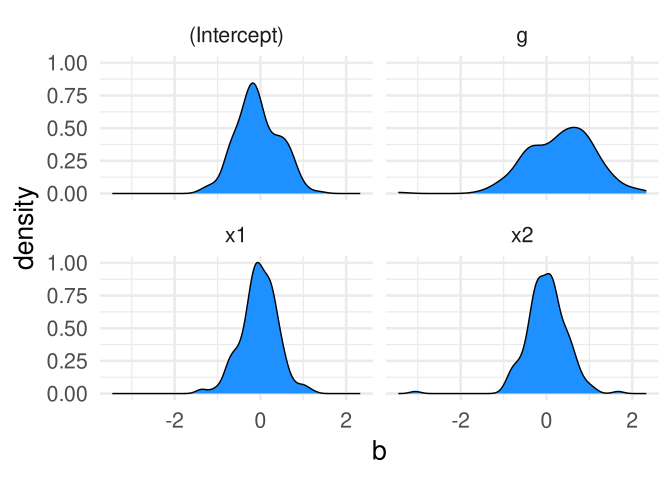
Or compute the statistical power for each parameter:
simd |>
    group_by(param, n, b1) |>
    summarise(power = mean(p <= 0.05))
# A tibble: 24 × 4
# Groups: param, n [12]
param n b1 power
<chr> <dbl> <dbl> <dbl>
1 (Intercept) 10 0.1 0.03
2 (Intercept) 10 0.5 0.07
3 (Intercept) 50 0.1 0
4 (Intercept) 50 0.5 0.09
5 (Intercept) 100 0.1 0.08
6 (Intercept) 100 0.5 0.02
7 g 10 0.1 0.04
8 g 10 0.5 0.09
9 g 50 0.1 0.07
10 g 50 0.5 0.35
# ℹ 14 more rowssimd |>
group_by(param, n, b1) |>
summarise(power = mean(p <= 0.05)) |>
filter(param == "g") |>
ggplot(aes(x = n, y = power, color = factor(b1))) +
geom_point(size = 4) +
geom_line()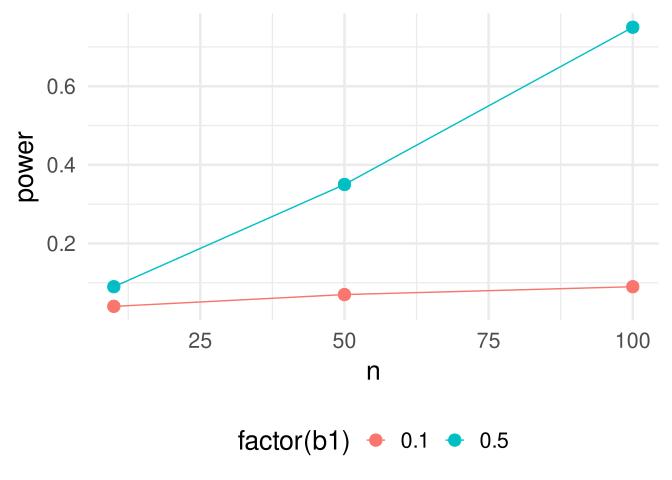
The whole simulation
Finally, we can draft a very general simulation script as:
rm(list = ls()) # clean the workspace
set.seed()      # setting the seed

## DATA GENERATION FUNCTION

sim_data <- function(...){
    # simulation process here
}

## FITTING FUNCTION

fit_model <- function(...){
    # model fitting
}

## MODEL SUMMARY FUNCTION

summary_model <- function(...){
    # extract model information
}

## SINGLE SIMULATION FUNCTION

do_sim <- function(...){
    dat <- sim_data(...)
    fit <- fit_model(dat, ...)
    summary_model(fit, ...)
}

## MULTIPLE SIMULATION FUNCTION

do_sims <- function(nsim = 1, ...){
    res <- replicate(nsim, do_sim(...), simplify = FALSE)
    dplyr::bind_rows(res, .id = "sim")
}

## CREATING THE SIMULATION GRID

sim <- tidyr::expand_grid(
    nsim,
    ... # all the simulation conditions, same order as in do_sims function
)

## ITERATION

sim$res <- purrr::pmap(do_sims, sim)

## SAVING

saveRDS(sim, "sim.rds")

## THEN, UNNESTING AND POSTPROCESSING
Additional tips
Saving, rds
A suggestion after running the full simulation with mapply or purr::pmap is saving the full simulation object. The rds or rda format is the best because it saves directly an R object that can be easily loaded. Saving the sim object is basically as saving the full simulation with conditions and results, within a single object.
set.seed()
At the beginning of your script, you can (and you should) set the seed for being able to reproduce the full simulation.
Errors-safe functions
The previous approach can be considered pretty robust. However, the data generation process and the fitted models are very simple. In other terms, errors are quite unlikely. I am not thinking about simulation errors (wrong parameters, etc.) but unpredictable and non-systematic errors due to repeating a certain operation multiple times. For example, with complex models sometimes the algorithm did not converge.
This is a big issue, because a simple error could break a very long simulation. We should be able to simply skip an iteration in the presence of an error.
We can use a so-called try-catch structure. Basically, is a control flow that evaluate a function and in the case of an error it will skip the iteration.
The purrr::possibly() function create a wrapper of any function that when called and an error emerge, it returns a predetermined value instead of breaking the flow.
ssim_data <- purrr::possibly(sim_data, otherwise = NULL)
# otherwise is the value to return, default to NULL
I append s at the beginning of these new functions to say that this is a safe function. Let’s see how it works:
sim_data(0) # this raise an error, wrong or impossible argumentsError in sim_data(0): argument "b0" is missing, with no defaultssim_data(0)NULL# with no errors, works as expected
ssim_data(10, 0, 0, 0, 0, 1) y g x1 x2
1 0.9700491 0 0.7419965 1.72559368
2 0.4073204 0 -1.3116687 -0.40649613
3 -0.4509853 0 -1.0643840 0.65367034
4 0.5218878 0 -1.6517924 -0.54554197
5 0.5693478 0 0.6524652 -0.43314952
6 0.6267855 1 0.8451364 -0.08011762
7 -1.7478548 1 -0.8217258 0.71932309
8 0.9807266 1 0.1055678 0.76748272
9 -0.3003896 1 -0.4923023 1.37297335
10 -0.4372885 1 -1.5792448 -0.41165617We can improve our simulation, creating a safe version of our functions or a specific target function. In our case could be the do_sim function:
sdo_sim <- purrr::possibly(do_sim, otherwise = NULL)
do_sims <- function(nsim = 1, n, b0, b1, b2, b3, s){
    res <- replicate(nsim, sdo_sim(n, b0, b1, b2, b3, s), simplify = FALSE)
    dplyr::bind_rows(res, .id = "sim")
}
Make sure that the returned value can be handled when stacking all the results. The safest option is probably just skip the iteration thus some conditions will have less than 100 iterations.
Optimizing the simulation and parallel computing
For very complex simulation studies, simply running the full simulation is not enough because the number of iterations and/or conditions is so large or computationally expensive that the total required time is not feasible on a single pc. We have three options here:
- Optimize as much as possible one single iteration. In other terms make sure the
do_simfunction runs as fast as possible. We will see some tips about optimization. - Run the simulation in parallel on multiple cores. By default, the simulation runs on a single core serially. Modern computers have multiple cores, and you can divide the simulation effort on multiple cores. This can drastically reduce the running time.
- If you can access a cluster or a server with a lot of cores, you can improve the parallel processing even further.
Optimizing
Is not always possible to optimize a simulation, but there are some general suggestions that we can apply:
- Reduce the number of non-base R functions as much as possible or find alternatives that are faster, not slower compared to base R functions
- Try to improve the model fitting function using options that speed up the model fitting. This really depends on the specific model. For example, in
lme4::glmer()changing the optimizer can improve the speed. - In general, include within a function only the really necessary steps. An extra function call in a regular script means few milliseconds more but when you have to repeat something 10000 times, even few milliseconds matters.
Base R vs non-Base R
This is not something about being base-R purists. Sometimes, the price for having a function doing something better or easier is an increase computational time. Let’s see an example for a model summary function. The broom package is amazing for extracting a data-frame with parameters, standard error and so on from a fitted model.
library(broom)
dat <- sim_data(100, 0, 0, 0, 0, 1)
fit <- fit_model(dat)
broom::tidy(fit)
# A tibble: 4 × 5
term estimate std.error statistic p.value
<chr> <dbl> <dbl> <dbl> <dbl>
1 (Intercept) -0.0967 0.148 -0.654 0.515
2 g 0.0918 0.217 0.423 0.673
3 x1 0.0330 0.0980 0.337 0.737
4 x2 0.0806 0.106 0.760 0.449I have to say that tidy() is an amazing function, especially for applied analyses and creating tables from fitted models. However, it is really slow in simulations. Let’s try to see the computational time for repeating the function call a lot of times.
microbenchmark::microbenchmark(
    tidy(fit),
    times = 1e3
)
Unit: microseconds
expr min lq mean median uq max neval
tidy(fit) 673.814 705.012 781.678 728.1755 774.4475 4700.565 1000Let’s create a version of tidy that is similar to summary_fit(). Let’s see the difference:
my_tidy <- function(x){
    xs <- data.frame(coef(summary(x)))
    xs$param <- rownames(xs)
    rownames(xs) <- NULL
    names(xs) <- c("b", "se", "t", "p", "param")
    xs
}

microbenchmark::microbenchmark(
    my_tidy(fit),
    times = 1e3
)
Unit: microseconds
expr min lq mean median uq max neval
my_tidy(fit) 168.136 172.2685 188.075 175.0935 179.812 4013.276 1000You see that my function is 4 times faster. Maybe this is not something that will improve drastically the simulation. However, having multiple non-optimized steps in a large simulation will make a difference.
Parallel computing
Parallel computing is a very large and complex topic. However with the right setup, in R can be really easy to run a simulation using multiple cores. We need the future package and a function that is able to run on multiple cores. There are different options, the easiest to use is the furrr package. The package provides the same functions as purrr with the parallel twist.
library(future)

parallel::detectCores(logical = FALSE) # number of available cores
[1] 12nc <- parallel::detectCores() - 1 # always leave at least 1 core for the other pc processeslibrary(furrr)
plan(multisession(workers = nc)) # allocate cores
# from now, everthing will be computed in parallel if using the appropriate function
sim$res <- furrr::future_pmap(
do_sims,
sim,
.options = furrr_options(seed = TRUE), # for proper seed handling in parallel processes
.progress = TRUE # for a progrees bar
)This is a simple example, and you need to read something more about parallel processing. However, even with this simple example you are able to run the simulation in parallel.
.options = furrr_options(seed = TRUE)is an important parameter. See thefurrrdocumentation and?future_pmapplan(multisessions())is one of the available options. See?plan. Basically, the usual default isplan(multicore())whileplan(multisessions())is like opening multipleRStudiosessions.plan(multicore())is not available interactively thus running code line-by-line using R Studio for stability issues. For a large simulation study it is better to run the R script from the command line usingRscript simulation.R. Make sure add a saving function within the script because the session is not interactive.
Take home message
The final message here is that, our effort to create a modular simulation approach encapsulating the steps into smaller functions is, in my opinion, the best and most general method. In addition, creating the simulation grid and mapping over the rows allows us to easily extend the simulation to multiple conditions. Given that each row/condition (and also each iteration) is independent and self-contained, switching to the parallel version is very easy. This is not the same as creating a series of nested loops where the parallel version is not easily available.